



2017-11-09 How to remove HTTP content & external link & Active content from my listing?
For removing HTTP content:
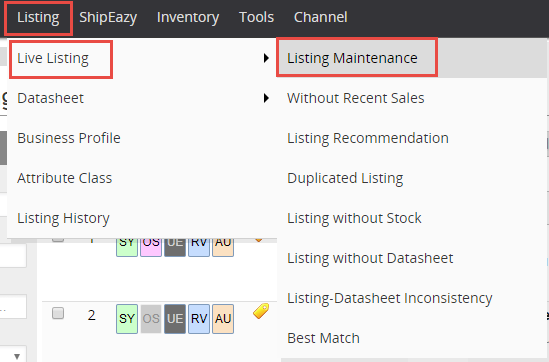
Please log in to SoldEazy system, go to Listing > Live Listing > Listing Maintenance
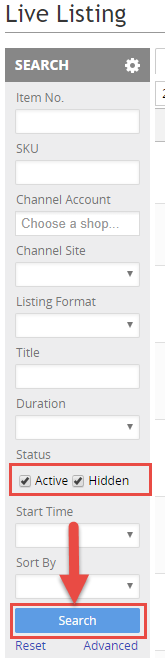
Search for both active and hidden(out of stock) listings
Select all listings that you want to remove HTTP content from
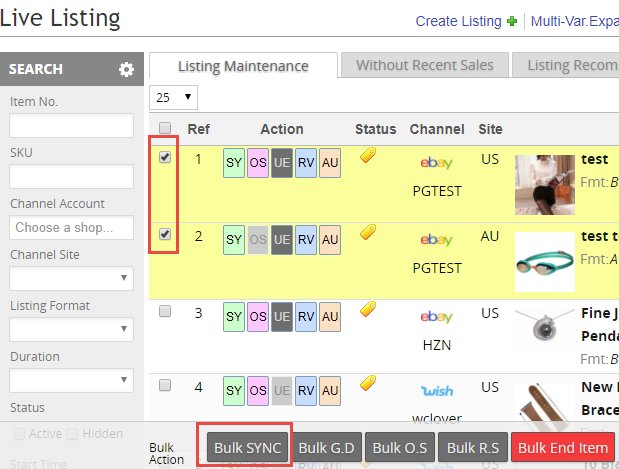
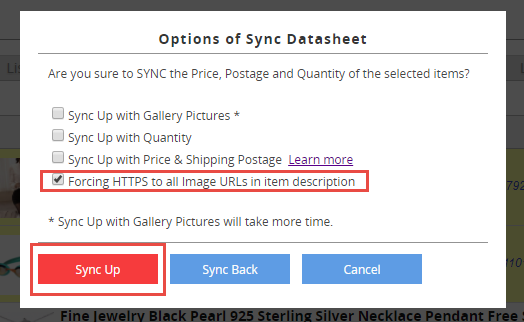
Clock "Bulk SYNC" button, then make sure "Forcing HTTPS to all Image URLs in item description" option is checked, then click "Sync Up"
a "New bulk job added" sign will appear, then you'll know that a bulk job will be running.

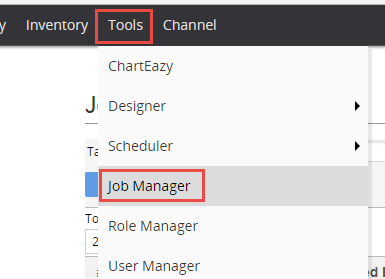
Please go to Tools > Job Manager to check the progress of the bulk task above.
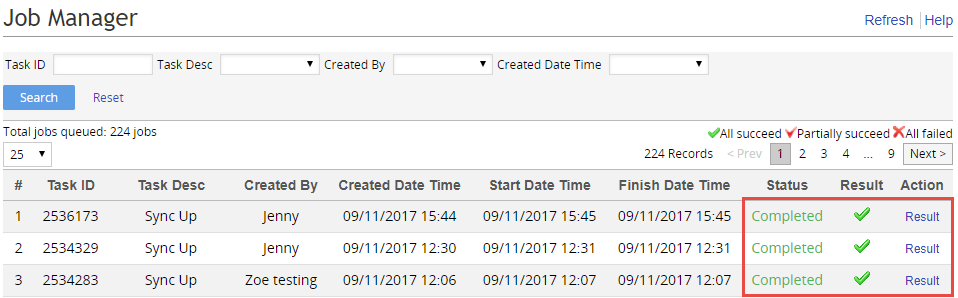
When all listings are synced up to eBay, you will see a green check sign next to the task.
These steps will also resolve your External link & Active content problems in SoldEazy Listing Template, but if you are not using SoldEazy listing description template, or somehow the template settings became invalid, you might want to go to eBay back end and remove those contents directly on eBay.
If your account is under limitation, or the listing is ending soon, the sync up job might not be entirely successful, please modify them in eBay back end.
 Print Article
 Email Article to Friend
 Export to PDF