
SoldEazy Help and Support

Operation out of stock (Bulk O.S) error: The quantity must be a valid number greater than 0.
Operation out of stock (Bulk O.S)  error: The quantity must be a valid number greater than 0.
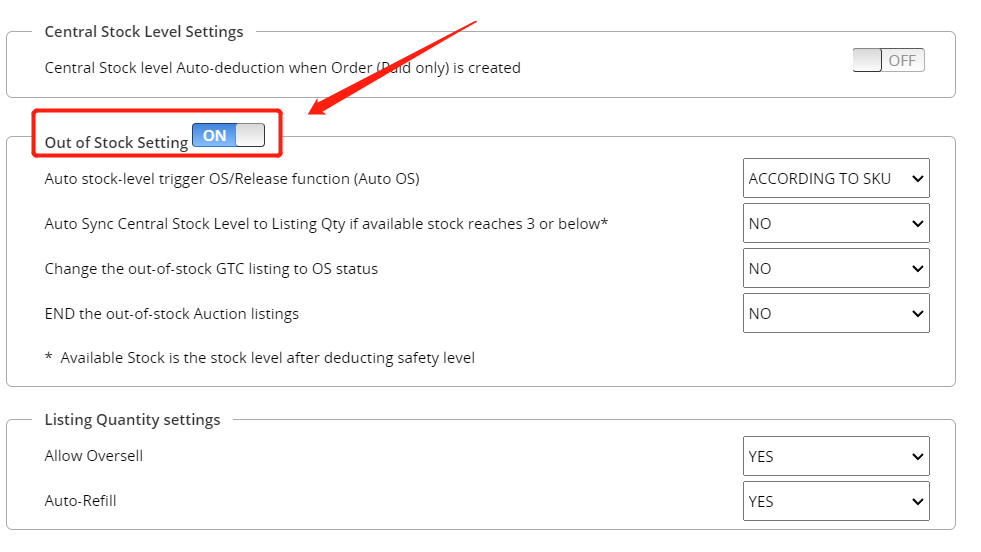

Reason: If you click "Out of Stock "(Bulk O.S) to display an appeal error, it is probably because the main switch of "Out of Stock Settings" is not turned on.
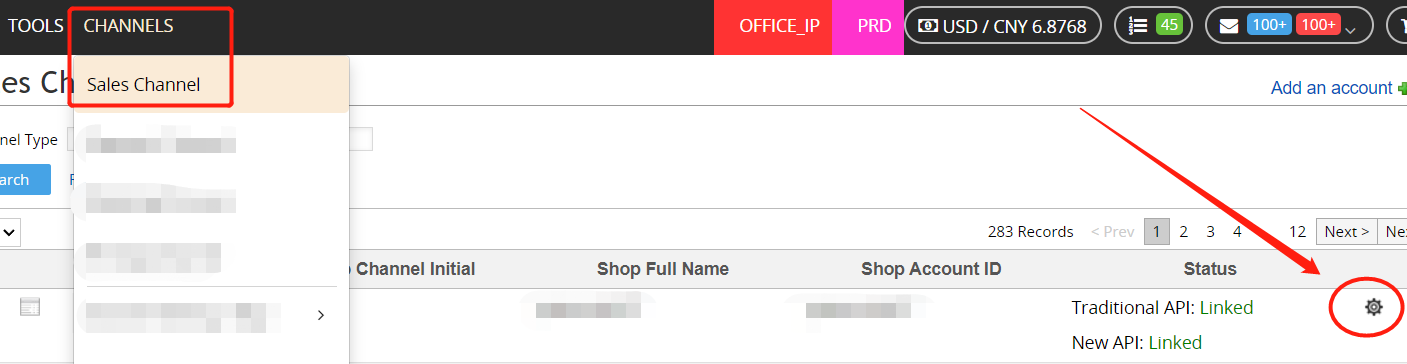
Solution: Go to "Channels >Sales Channel", click the small gear icon behind the corresponding eBay account, and open the "Out of Stock Setting ", as shown below:

If you can't find the "Channels >Sales Channel" page in the system, it is recommended to contact the administrator or a colleague with permission to deal with it.

***Fin***

0 (No)
Article Rating (No Votes)
Rate this article
Attachments
There are no attachments for this article.
Related Articles RSS Feed
unknown:All compatibilities are invalid, Item not listed.
Viewed 4946 times since Fri, Mar 24, 2023
Error of listing or synchronization: Sorry, you cannot list fixed price auctions
Viewed 3723 times since Tue, Jul 28, 2020
Error:This item cannot be listed or modified. Item title/ description has improper words
Viewed 3664 times since Thu, Jan 11, 2018
Buy It Now Dutch Auctions are not supported at this time.
Viewed 46691 times since Mon, Aug 6, 2018
Error: Please enter a valid ZIP Code
Viewed 8201 times since Wed, Mar 22, 2023
Error: Variations specifics and item specifics entered for a multi-SKU item should be different
Viewed 14453 times since Thu, Jul 30, 2020
Error: No eBay Category was Found for this site.
Viewed 1378 times since Wed, Jul 10, 2024
SKUs do not match for ManageBySKU item specified by ItemID (Solution)
Viewed 35485 times since Wed, Jul 29, 2020
Error: Duplicate name-value combination in variation specifics.
Viewed 4571 times since Mon, Aug 6, 2018
Error:For security reasons, please login again(Eng)
Viewed 7668 times since Fri, Jul 10, 2020