SoldEazy Help and Support

Use of eBay Promoted Offsite

Use of eBay Promoted Offsite
  1. Use of eBay Promoted Offsite
1. Use of eBay Promoted Offsite

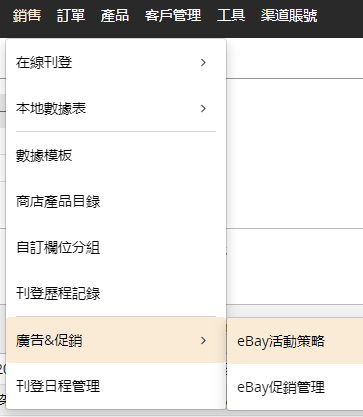
Go to Sales > Advertising & Promotions > eBay Campaign Strategy

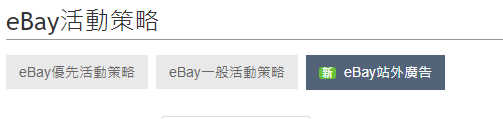
Click on the <Off-site Advertising> tab

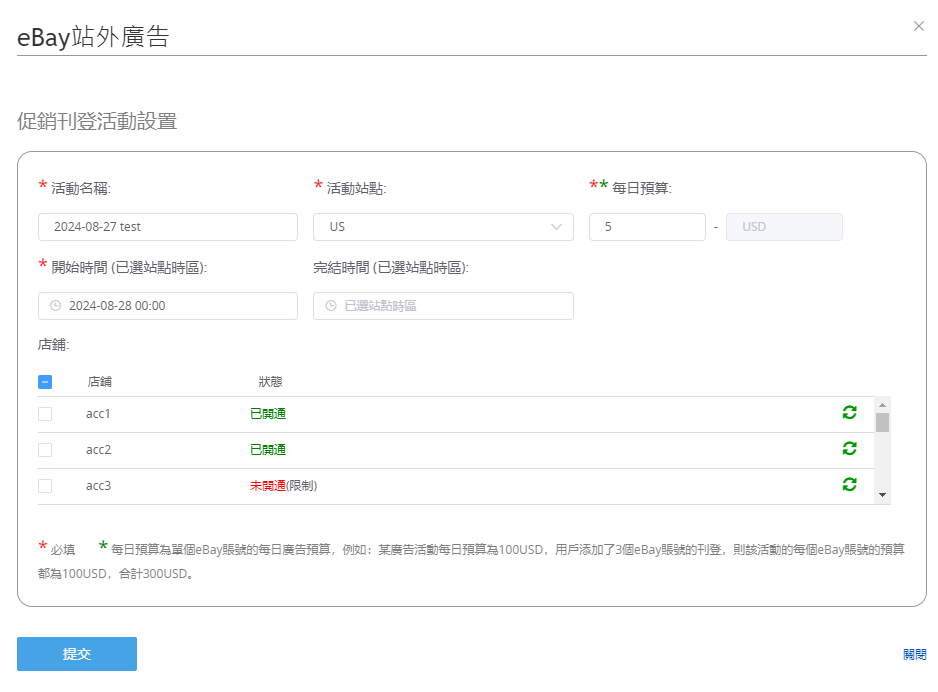
Click <Create New eBay Off-site Advertisement> , set the campaign name, site, budget, start time, end time (optional), and specify the eBay account

Click <Submit> to complete the settings.

eBay will automatically select the corresponding sites of these accounts to publish off-site advertisements on search engines such as Google.


***Fin***

0 (0)
Article Rating (No Votes)
Rate this article
Attachments
There are no attachments for this article.
Related Articles RSS Feed
How to switch to or apply an updated business profile?
Viewed 3427 times since Mon, Feb 13, 2023
Latest translation function (eBay translation API & order message translation)
Viewed 5205 times since Wed, Jul 29, 2020
Promoted Listings Priority Strategy Campaign - PLP
Viewed 7823 times since Thu, Nov 25, 2021
VAT settings in Business Profile
Viewed 18320 times since Tue, Sep 29, 2020
04 Listing Schedule
Viewed 4241 times since Thu, Nov 30, 2017
How to use eBay business policies?
Viewed 3332 times since Thu, Dec 22, 2022
How to accept/decline best offer from buyer or send counteroffer?
Viewed 707 times since Thu, Jan 22, 2026
02 Add/ Modify Product Identifiers (GTIN)
Viewed 4343 times since Wed, Nov 29, 2017
01 Automation
Viewed 4420 times since Wed, Nov 29, 2017
05 Promoted Listings - General Strategy(PLG)
Viewed 24694 times since Thu, Nov 30, 2017