SoldEazy Help and Support

How to find duplicate datasheets?

How to find duplicate datasheets?
  1. How to find duplicate datasheets?
1. How to find duplicate datasheets?

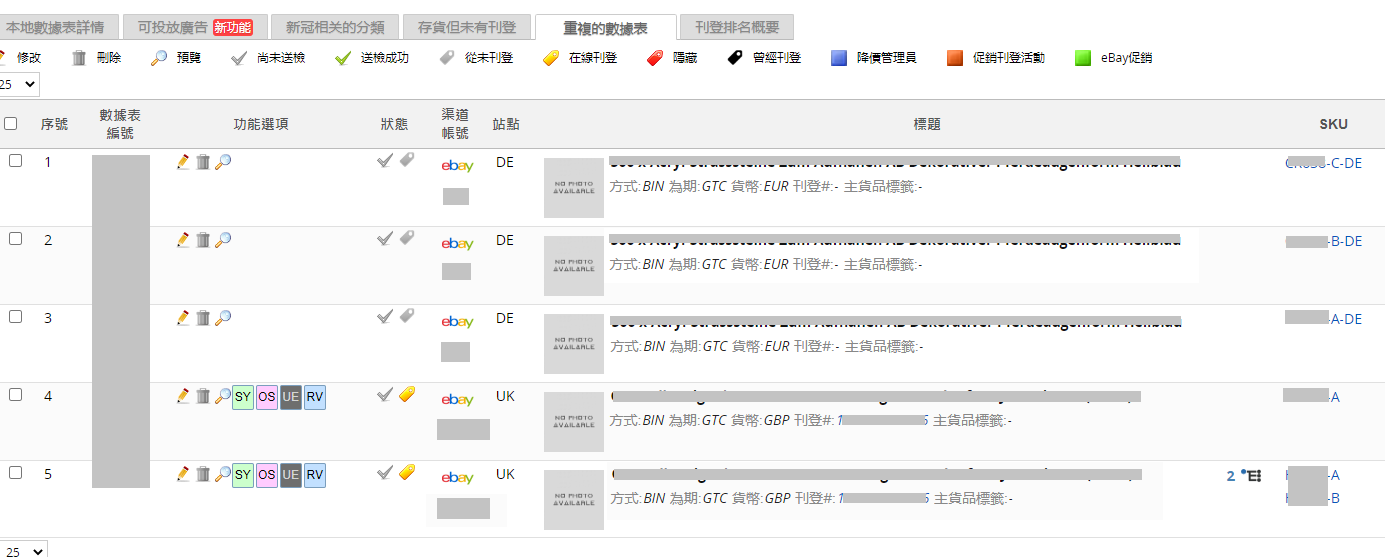
Go to Sell>Datasheet>Duplicate Datasheets.

You will see datasheets that are considered duplicate appear in groups.

Standard: eBay account, eBay site, title, listing format. If the 4 columns are the same but SKUs are different, they are still considered duplicate.


***Fin***

0 (No)
Article Rating (No Votes)
Rate this article
Attachments
There are no attachments for this article.
Related Articles RSS Feed
Add Information Related to the General Product Safety Regulation (GPSR)
Viewed 2187 times since Wed, Nov 20, 2024
How to add eBay Product ID (ePID) to the datasheet?
Viewed 101979 times since Mon, Jul 27, 2020
How to find out the listing that needs to add the eBay product ID (ePID)?
Viewed 5326 times since Mon, Jul 27, 2020
08 The Use of PowerClone
Viewed 6599 times since Tue, Nov 14, 2017
How to use eBay shipping rate table
Viewed 15453 times since Mon, May 16, 2022
01 Creating Multi-variation Listings
Viewed 5547 times since Tue, Nov 14, 2017
02 The Use of Transform
Viewed 5143 times since Tue, Nov 14, 2017
GS1 HK membership application & GTIN bulk retrieving
Viewed 13868 times since Tue, Jan 30, 2018
eBay Multi-Warehouse function
Viewed 3152 times since Fri, Jul 26, 2024
03 Bulk PHOTO MIGRATION Function
Viewed 3988 times since Mon, Sep 3, 2018